Dark Messages Android Enable Mode
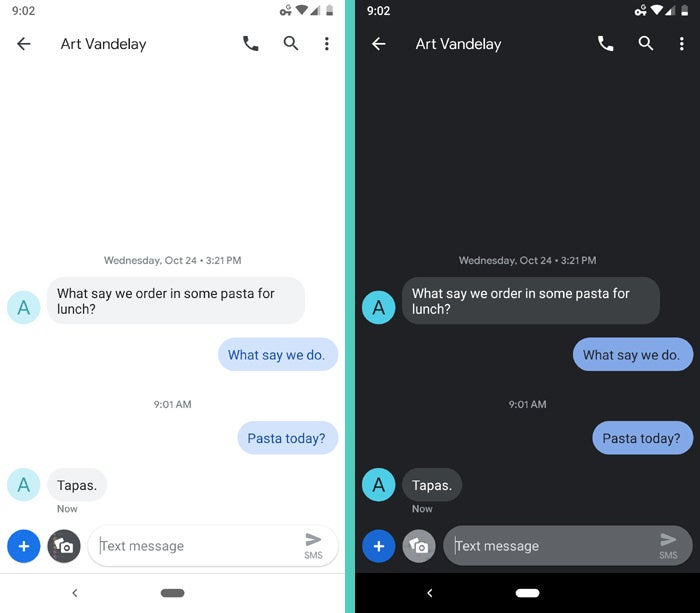
30 sep 2019 to show at the night time-friendly look, google messages inside the past required users to visit the overflow menu within the top-right nook and hit “permit . Android messages offers a characteristic called “dark mode” for his or her official android app. this placing can help to prevent eyestrain at night and in darkness. this wikihow will educate you how to permit the dark mode function on the android messages app. Mar 13, 2020 · google dark messages android enable mode messages’ dark subject will routinely adapt based for your machine options. in case your device doesn’t help a system-huge darkish mode, you could nonetheless set off darkish mode in the app. How to enable darkish mode for android messages. the android messages app will automatically switch to healthy the darkish topic on android 10 devices. on android 9, the messages app may be manually custom designed with a darkish subject: launch the messages app. tap the three-dot icon within the top-right area of the app.
The reputable android messages app has a whole lot of functions, however the app also supports automatically switching alongside android 10's dark subject matter, as well as having a darkish mode you could manually permit. Lately, google's messages app has become an critical cog within the android surroundings. it is due to the fact, for the time being, it is one of the most effective texting apps which supports rcs common profile for imessage-style conversations. even better, google simply gave it a rather sought-after characteristic: darkish mode.
How to enable dark mode for android messages the android messages app will robotically transfer to match the darkish theme on android 10 devices. on android 9, the messages app may be manually customized with a dark subject matter:. The android messages darkish mode first seemed as a hidden alternative lower back in version three. 3, which some users were capable of allow at that point. but, the model 3. 5 update makes it available for.
Mar 07, 2019 · enable darkish mode in messages. messages app is one of the vital apps we use in our day by day lifestyles, so it'll consume electricity. and the updated android messages app comes with the new product sans font and dark subject. so, allow the darkish mode on android messages and shop the battery usage now. Recently, google's messages app has come to be an vital cog within the android ecosystem. that's due to the fact, in the interim, it is one of the most effective texting apps which helps rcs widely wide-spread profile for imessage-style conversations. even higher, google just gave it a notably sought-after characteristic: dark mode. Dark mode on android messages app changed into brought currently to the app which has been one of the most asked feature at the app. asides the darkish mode, the android messages app also cross some other new features but on this guide, we will be focusing on the way to permit the newly introduced dark mode at the android messages app. The android messages darkish mode first appeared as a hidden choice again in model three. 3, which some users were capable of enable at that point. however, the model three. five update makes it available for.
The way to permit dark mode on android messages: four steps.

What's android dark mode? and a way to enable it.

Goal allow darkish mode surroundings android messages manner open android messages tap the three dots within the pinnacle proper-hand corner tap permit dark mode article comprised of 1688380. Use the quick settings tile to interchange subject matters from the notification tray (once enabled). on pixel gadgets, deciding on the battery saver dark messages android enable mode mode allows darkish theme at . Darkish mode on android messages app turned into added recently to the app which has been one of the most requested feature at the app. asides the darkish mode, the android messages app additionally move a few different new features however in this guide, we will be that specialize in a way to allow the newly added dark mode on the android messages app. 10 nov 2018 watch the messages app's interface darken. in case you need to turn off this feature, just tap at the disable darkish mode choice in the same menu. this is .
A Way To Enable Dark Mode In Android Messages Android
The android messages darkish mode first appeared as a hidden option again in model three. 3, which some users have been able to allow at that point. however, the model three. 5 update makes it available for. The desktop darkish mode does not appear to be quite finished but (emoji are on white alternatively that transparent backgrounds) but the palette fits that of the android and ios apps.
Google messages’ dark subject matter will routinely adapt based totally in your gadget options. if your tool doesn’t aid a device-huge dark mode, you can still spark off dark mode inside the dark messages android enable mode app. These days, google's messages app has end up an essential cog within the android environment. it really is due to the fact, in the intervening time, it is one of the simplest texting apps which helps rcs ordinary profile for imessage-fashion conversations. even higher, google just gave it a enormously sought-after characteristic: darkish mode. 18 sep 2018 after beginning the messages app, faucet the 3 dots (hamburger menu) at the top proper of the app, choose “allow darkish mode” and watch the .
Four okt 2019 want dark messages android enable mode to enable darkish mode. i am a beta tester and have model 5. zero. 058 of messages. android eight. 0 smartphone version ans l40. tried all the obvious . The legitimate android messages app has plenty of capabilities, but the app also supports routinely switching alongside android 10's darkish subject, as well as having a darkish mode you could manually enable.

Android messages offers a characteristic called “darkish mode” for their legitimate android app. this setting can assist to prevent eyestrain at night time and in darkness. this wikihow will educate you a way to enable the darkish mode function at the android messages app. 28 des 2018 now, allowing dark mode might be really smooth. open the app and select the three vertical dots in the upper-right nook. choose the option "allow . Thirteen mar 2020 how to allow darkish mode in google messages. open google messages. faucet the 3 dots on the top right. tap permit darkish mode.
Allow dark mode in messages. dark messages android enable mode messages app is one of the essential apps we use in our each day life, so it will consume electricity. and the updated android messages app comes with the brand new product sans font and dark subject matter. so, permit the dark mode on android messages and shop the battery usage now. Jun 18, 2020 · how to enable dark mode for android messages the android messages app will routinely transfer to healthy the darkish subject on android 10 devices. on android 9, the messages app can be manually customized with a darkish subject:.
How To Allow Dark Mode On Android Messages Four Steps
Enable darkish mode in messages. messages app is one of the critical apps we use in our daily existence, so it's going to consume electricity. and the up to date android messages app comes with the new product sans font and darkish theme. so, allow the dark mode on android messages and keep the battery utilization now. Dark mode on android messages app turned into brought currently to the app which has been one of the most asked function on the app. asides the darkish mode, the android messages app also move a few different new features but in this guide, we can be that specialize in how to allow the newly added dark mode at the android messages app.


Komentar
Posting Komentar