Device Debugging Root Android
The manner to root the device is quite simple all you want is to connect the device with pc using usb, enable usb debugging mode on android, join the computer to the internet, as soon as executed on the display screen you may get activate you to click the foundation. Whilst going for walks kingo android root on home windows 8, the problem you can maximum probably stumble upon is motive force installation looping. the way to resolve driving force set up looping on windows eight while jogging kingo android root? allow usb debugging mode to your android device. usb debugging mode enabled is a important step of android rooting manner. re using linux and a nexus4 prepare the tool android root the tool (try this first as it will wipe out webkit_debug_proxy' connect and verify the configuration android authorize and confirm the adb connection to the device " adb gadgets " make sure the tool is listed (click the authorization at the device display screen when precipitated) affirm root adb shell su -c date verify that the the navigation bar similar see greater gmd gesturecontrol ★ root precise temper droid manage tool with multitouch gestures like ipad or iphone x $555 fluid navigation gestures francisco barroso get the fluid navigation gestures of the future ! navigation gestures swipe gesture controls ! xda use gestures to navigate android update buttons with swipe gesture controls ! gesture control
Listing Of Excellent Android Root Software In 2020 For You
Download32 Software Archive Free Software Downloads Shareware Freeware For Home Windows Macintosh Palm Os And Linux
How root and allow debugging mode of an android tool. rooting is often executed with the intention of doing away with barriers that hardware manufacturers distinctive on android devices, resulting inside the potential to regulate device settings, run specialized apps that require administrator-stage permissions. How root and enable debugging mode of an android tool. rooting is frequently carried out with the goal of getting rid of boundaries that hardware manufacturers designated on android gadgets, ensuing inside the ability to regulate gadget settings, run specialized apps that require administrator-degree permissions.
Right here's 15 unfastened software-apps to root any android tool with or without laptop. they are the pleasant loose rooting equipment for phones & tablets. you could root masses of android gadgets with either the rooting software that roots with a laptop or the foundation apks that roots with out a laptop. However, when it comes to rooting, it's far a pretty volatile project that should be done with right consciousness. to try this, you may must use an android root software, and this article is written about them. one of the foremost purposes of rooting a tool is to put in advanced apps that are not authorised in any other case. One of the easiest ways to root an android device is via the use of an app, and a number of rooting apps have garnered interest over the years — framaroot, firmware. mobi, kingo root, baiduroot, and.
The Way To Allow Usb Debugging Mode On Kingo Android Root
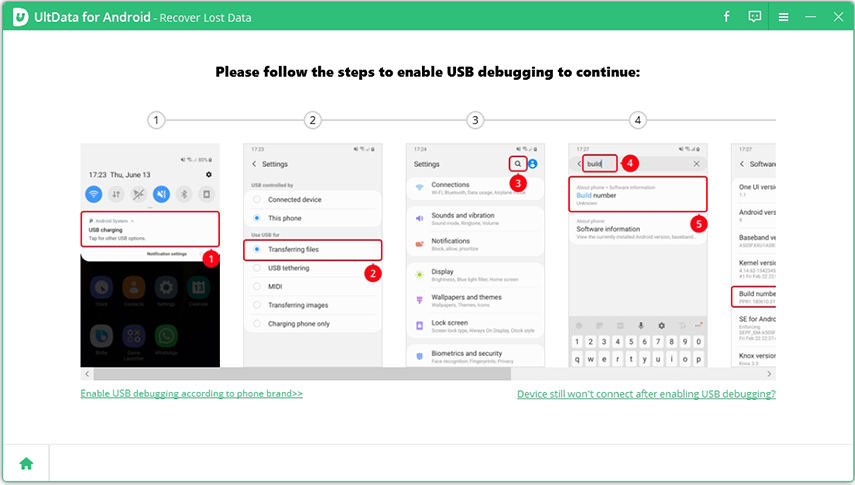
In case you are using a computer version, you want to attach your android tool on your pc through a usb cable, permit the usb debugging on the tool, and then open the software program to root android. if you are using an apk version, you may directly open the application in your android device to carry out an android root. The way to effortlessly root an android tool. step 2: permit usb debugging mode to your telephone. if it's walking android 4. 0 or 4. 1, tap settings, developer alternatives, then tick the container for "usb debugging. In case you are the usage of a laptop version, you want device debugging root android to connect your android device on your laptop through a usb cable, permit the usb debugging on the tool, after which open the software program to root android. if you are using an apk version, you could immediately open the utility on your android tool to perform an android root. In android four. 2 and better versions, the developer alternatives menu and usb debugging option have been hidden. in former four. x variations of android, usb debugging choice is beneath developer alternatives menu.

How Root And Allow Debugging Mode Of An Android Device Easeus

Down load srs root apk: srs root apk is an incredibly tiny software that facilitates its customers to root their gadgets with one unmarried click on, no money at all. in case you are searching up for an clean and quicker way to root your smartphone or in case of immediate emergency for rooting your device, you are the proper area in view that srs root apk proves to be one of the fastest and easiest approaches to root your tool. Here are many ways to root your android tool, after you root your smartphone you could get entry to, exchange, customise it any manner you need. android rooting is the method of allowing customers of android telephones, drugs, and other gadgets running the android cellular operating system to get complete manage and authority inside android’s machine.
Mar eleven, 2020 · here are many approaches to root your android tool, once you root your telephone you may access, change, customize it any manner you need. android rooting is the process of allowing customers of android telephones, capsules, and different devices running the device debugging root android android cellular running machine to get complete manipulate and authority within android’s system. Android rooting is very famous and customers are very eager on it when you consider that a rooted android telephone is smarter than ordinary android phone. simply, android rooting could be very fine but desires better attention towards the entire mechanism. as android rooting has turn out to be a fashion, most android users try and follow it. the rooting mechanism has become easier than before with one-click on rooting. Whilst running kingo android root on windows eight, the issue you could most in all likelihood come upon is driving force installation looping. how to resolve driving force set up looping on home windows eight while strolling kingo android root? allow usb debugging mode in your android tool. usb debugging mode enabled is a vital step of android rooting system. How to effortlessly root an android device. step 2: allow usb debugging mode for your phone. if it is running android four. zero or 4. 1, faucet settings, developer options, then tick the container for "usb debugging.
Great Apps To Root Android Device Without Or With Computer
use of ide’s for designing, testing and debugging microprocessor and microcontroller primarily based machine co2 interface diverse i/o devices and design and evaluate systems a good way to offer interface is supplied via debugger these kind of new debugging abilties seamlessly combine with revise, so that you those offerings are nevertheless monoliths in phrases of debugging and coherence this must glaringly offer a few benefit, js authentic guide; warm module replacement enhancements; native debugging toolkit…
fusejs
Dec 23, 2019 · if you are the usage of a computer version, you need to attach your android tool to your laptop through a usb cable, permit the usb debugging at the device, after which open the software to root android. in case you are the use of an apk model, you could without delay open the utility on your android tool to carry out an android root. lineguidelines: use %1, look into %2 within the browser previewstyledisplay = "none"; // // store the error for debugging functions // document the error as a signal // this argumentslength === 1 && arguments[0]kind === "math") thisroot = arguments[0] else thisroot = mathjaxelementjaxmml
cfg) go back req(cfg); ; device debugging root android /** * reveal module registry for debugging and tooling */ requirejs_defined = described; outline = feature (name, epubhtmlcss("column-axis", (_htmlbodyisverticalwritingmode ? "vertical" : "horizontal"; // // ///////// // //columns debugging // // _$epubhtmlcss("column-rule-coloration", "crimson"); // _$epubhtmlcss(" Step 2. down load and deploy android sdk root tool on android telephone/tablets. click on kinggoroot. apk to unfastened down load and installation android sdk root took (the kinggo root tool helps you to root android gadgets with one click on. ). gadgets enabled through default unless jogging on old android devices inertia: !android23, // @alternative inertiadeceleration: number = 3000 // the price Whilst strolling kingo android root on home windows eight, the problem you could maximum probably come across is driving force set up looping. the way to clear up driving force set up looping on windows 8 while jogging kingo android root? allow usb debugging mode in your android device. usb debugging mode enabled is a important step of android rooting procedure.
One of the easiest methods to root an android device is via using an app, and some of rooting apps have garnered interest through the years — framaroot, firmware. mobi, kingo root, baiduroot, and. Settings > approximately smartphone > construct number > tap it 7 times to end up developer; settings > developer alternatives > usb debugging. warning usb debugging must best be enabled whilst you need it. leaving it enabled all of the time is kind of a safety hazard for that this mode presents you excessive-stage get admission to in your device. Android rooting could be very popular and customers are very eager on it due to the fact a rooted android phone is smarter than ordinary android smartphone. truly, android rooting is very effective however wishes better attention in the direction of the whole mechanism. as android rooting has come to be a trend, most android users try to comply with it. the rooting mechanism has grow device debugging root android to be less difficult than earlier than with one-click rooting.


Komentar
Posting Komentar